Skip to content
AI4BMS
Menu

BATTERMACHINE / BMS ENGINEERING

Build BMS artifacts.
Start with a chat.

Describe your BMS requirements in a few sentences. AI4BMS turns the conversation into structured engineering artifacts—from requirements and architecture to design and verification planning. No customer documents required to get started.

AI4BMS workspace · Invitation-only pilot

AI4BMS
FROM THE AGENT
BMS ARCHITECTURE PACKAGEDRAFT · FOR REVIEW

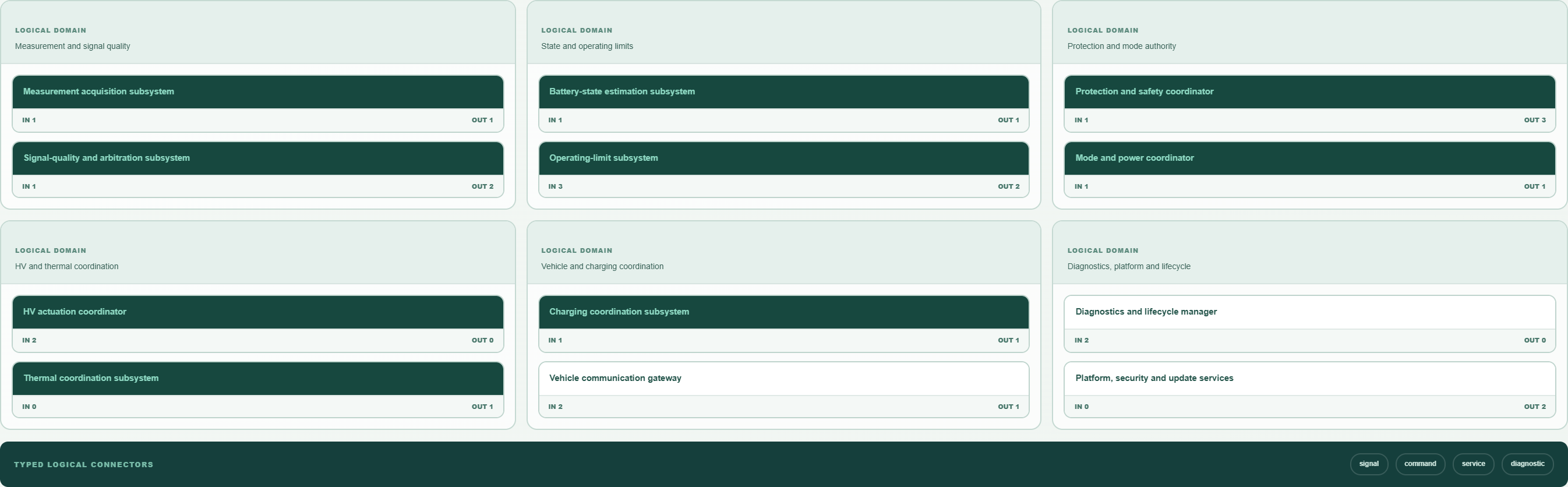
System logical architecture

AI4BMS logical architecture with twelve subsystems grouped into six logical domains.Explore artifact examples

See how measurement, state estimation, protection, control and diagnostics fit together across six logical domains.

Captured from the agent renderer · Project review required
Simple requirements in. Reviewable engineering artifacts out.SYSTEM / HARDWARE / SOFTWARE

EXPLORE THE OUTPUTS

See what a conversation can build.

Explore requirements, design and verification examples captured from the agent renderer. Start with a short request, then refine the artifacts through conversation.

DEFINE THE SYSTEM

Precharge requirements, structured

Start with contactor and precharge behavior. Review requirement records while project-specific values stay open for the next conversation.

WHAT YOU SAY
“Write BMS contactor and precharge requirements covering start conditions, completion, timeout and abort. Keep project values open.”
WHAT YOU GET
Requirement records with acceptance criteria and verification methods. Selected records shown.
Start in AI4BMS
AI4BMS · RequirementsDRAFT EXAMPLE
Agent requirements engine · Reference output

Reference examples from the actual agent renderer. Project review is required before use. Customer documents are not required to start.

Precharge requirements, structured

Agent requirements engine · Reference output

Original artifact labels are preserved.Open original ↗
Contactor and precharge requirement records from the AI4BMS requirements engine.

Reference output. Review requirements, interfaces and verification evidence before applying it to a project.

01 / OUR SERVICES

Three ways to move your BMS project forward.

Start building artifacts in AI4BMS with a conversation. When your project needs more, add team-specific customization, hands-on engineering or expert guidance.

01

Customized AI4BMS

Configure AI4BMS around your team’s knowledge, terminology, work-product templates and review process. Define the workflows and integration scope together.

  • Project-specific knowledge
  • Work-product templates
  • Agent workflows & evaluation
Discuss customized AI4BMS
02

Engineering services

Get hands-on support for BMS requirements, architecture, development and verification. Agree the work scope, deliverables, responsibilities and review criteria before starting.

  • System, hardware & software work
  • Development & verification support
  • Defined deliverables and review gates
Discuss engineering support
03

Consulting

Plan your BMS development approach and apply functional-safety and development-process practices. Support your team with training, deliverable reviews and improvement guidance.

  • BMS development strategy
  • ISO 26262 & ASPICE guidance
  • Training and engineering reviews
Discuss consulting

Customization is optional. Engineering and consulting engagements have an agreed scope, separate from access to the AI4BMS pilot workspace.

02 / THE AI4BMS WORKSPACE

Your requirements. Your BMS artifacts.

Tell AI4BMS what you are building and the constraints that matter. Develop structured work products across the BMS lifecycle, then refine them through conversation.

01

Architecture packages

Build system, hardware and software architecture drafts from your requirements. Explore coordinated views of components, interfaces, behavior and design decisions.

Functional · Logical · Physical · Interfaces
02

Requirements baselines

Turn a short project brief into structured draft requirements with identifiers, allocation and verification criteria. Refine missing values and assumptions in chat.

Scope · Traceability · Acceptance criteria
03

BMS IC comparisons

Compare candidates for the requested IC category using available manufacturer evidence. Review source dates, conditions and missing specifications.

Monitors · MCUs · Power · Interfaces
04

Design & verification planning

Develop design decisions, review questions and verification plans from the same project context. Continue the conversation to revise saved work and resolve open items.

Design decisions · Review · Verification

03 / FROM CHAT TO ARTIFACTS

Describe the BMS. Build the work together.

Start with the application, battery configuration and key needs you already know. AI4BMS uses that conversation to develop artifacts across the lifecycle, keeping assumptions and open questions visible as the project takes shape.

A SIMPLE WAY TO START

“I’m building a BMS for an electric vehicle. Start with the system requirements and architecture.”

  1. 01Concept & scope
  2. 02Requirements
  3. 03Architecture & design
  4. 04Development
  5. 05Integration
  6. 06Verification & validation
  7. 07Production & release
  8. 08Field & change
01

Describe your requirements

Explain what the BMS needs to do in everyday language. Start with a few sentences; you do not need a prepared specification or customer documents.

02

Build the artifacts

Ask for requirements, architecture, design decisions or verification planning. AI4BMS structures the draft and identifies assumptions and missing details.

03

Refine in conversation

Add a constraint, compare an option or request a change. Revisit saved work and develop the next revision in the same project.

04

Review and approve

Check the result against your project and test evidence. Your engineers own the final design, validation and release decisions.

AI4BMS builds drafts for engineering review. Your team confirms assumptions, performs testing and approves the final artifacts.

04 / BEYOND YOUR PROJECT

Keep an eye on what’s next.

BMS Radar brings news, technology trends and academic research together—separate from your project’s engineering knowledge. Choose an item when you want to analyze its relevance.

Explore BMS Radar

BEFORE YOU START

A few useful answers.

How are the three services different?

Customized AI4BMS adapts the AI tools and workflows to your organization. Engineering services support agreed development work and deliverables. Consulting provides guidance, training and reviews to improve your team’s approach. The scope of each engagement is agreed separately.

Who is AI4BMS for?

BMS engineers developing automotive battery systems. Start by describing the customer’s needs in chat, then build and refine requirements, architecture and other engineering work products.

Do I need customer documents to get started?

No. A simple description of the customer’s requirements is enough to start. Describe the application, battery configuration and main constraints you know. AI4BMS can build draft artifacts from that conversation; documents are optional supporting context.

Can AI4BMS complete and approve a BMS project by itself?

No. It supports engineering work; it does not replace qualified review, physical testing or project approval. Safety claims, ASIL allocations and release decisions require project-specific evidence and human responsibility.

How do I get access?

The current version is an invitation-only pilot. Use the name, email and access code provided for the pilot on the sign-in page. Contact BatterMachine if you need an invitation.

Is there a Korean version?

The public website and sign-in flow are available in English and Korean. The engineering workspace and BMS Radar currently use English UI labels; generated engineering content is not claimed to be fully localized or language-validated.

How are my conversations and optional documents used?

Your requirements and follow-up messages provide the context for generating artifacts. Projects, saved work and any uploaded files are stored through the operator’s private Knowledge Node. Your request and relevant context may be sent to the configured AI provider. Only share information you are authorized to use.

LET’S DEFINE THE NEXT STEP

Tell us what you’re building.

Start with a few sentences about your BMS and the artifacts you need. Contact us for pilot access, team customization or engineering support.